



📢 转载信息
原文链接:https://www.kdnuggets.com/getting-started-with-the-claude-agent-sdk
原文作者:Abid Ali Awan
Image by Author
# 引言
是否厌倦了将脚本、工具和提示词拼凑在一起?Claude Agent SDK 允许您将 Claude Code 的“规划 → 构建 → 运行”工作流转变为真正的、可编程的智能体,这样您就可以在无需大量胶水代码的情况下自动化任务、连接工具并发布命令行界面(CLI)应用程序。如果您已经在终端中使用 Claude,这个软件开发工具包(SDK)会以适当的结构、状态和可扩展性为您提供相同的体验。
在本教程中,您将设置 Claude Agent SDK 并构建一个小的、多工具的 CLI,实现端到端(规划 → 行动 → 验证)的步骤链接。在此过程中,您将了解如何注册工具、管理上下文以及编排本地工作流(如调试、代码生成和部署)的代理循环。
# 什么是 Claude Agent SDK?
Anthropic 的 Claude Sonnet 4.5 标志着能力的重大飞跃,它拥有先进的编码模型,在推理、数学和长上下文任务的行业基准测试中表现出色。此版本包括一个 Chrome 扩展程序、一个记忆工具和文档生成功能。其中最引人注目的组件是基于 Claude Code 基础构建的 Claude Agent SDK。
Claude Agent SDK 允许开发人员创建、扩展和定制由 Claude 驱动的应用程序。它能够与您的本地环境集成,使 Claude 能够访问您的工具,并有助于编排复杂的任务流程,包括编码、研究、记笔记和自动化。
# 设置 Claude Agent SDK
在构建之前,请确保您已同时设置好 Claude Code CLI 和 Claude Agent SDK。
// 1. 先决条件
// 2. 安装 Claude Code CLI
我们将通过在 PowerShell 中输入以下命令来在 Windows 上安装 Claude Code CLI:
irm https://claude.ai/install.ps1 | iex
然后将此路径添加到您的系统环境中:
C:\Users\\.local\bin
重启 PowerShell 并测试:
claude --version
对于其他平台,可以考虑使用 npm 包管理器:
npm i -g @anthropic-ai/claude-code
安装后,在终端中输入 claude 即可登录。
// 3. 安装 Claude Agent SDK (Python)
使用 pip 包管理器安装 Claude Agent Python SDK。
pip install claude-agent-sdk
如果收到 CLINotFoundError,请确保 Claude CLI 已正确安装并包含在您的 PATH 中。
# 使用 Claude Agent SDK 构建多工具应用
在本节中,我们将构建 TrendSmith 应用程序,该应用跨多个行业(包括初创企业、人工智能、金融和可持续发展)跟踪实时市场趋势。
它将 Claude Sonnet 4.5、WebSearch、WebFetch 和 本地存储 工具整合到一个多智能体系统中。
创建 Python 文件 trend_smith.py 并向其中添加以下代码:
// 1. 导入和基本设置
这会加载 Python 库、Claude Agent SDK 类型、一个微小的帮助菜单、模型名称以及用于状态行的柔和灰色文本样式。
import asyncio import os import re import sys import time from datetime import datetime from pathlib import Path from claude_agent_sdk import ( AssistantMessage, ClaudeAgentOptions, ClaudeSDKClient, ResultMessage, TextBlock, ToolResultBlock, ToolUseBlock, ) HELP = """Commands: /trend Quick multi-source scan (auto-saves markdown) /scan Short one-page scan /help /exit Help / Quit """ MODEL = os.getenv("CLAUDE_MODEL", "sonnet") # e.g. "sonnet-4.5" GRAY = "\033[90m" RESET = "\033[0m"
// 2. 系统提示和报告目标
这设置了答案的“内部规则”(快速、简洁、一致的部分),并为保存的简报在脚本旁边的 reports/ 文件夹中进行选择。
SYS = """You are TrendSmith, a fast, concise trend researcher. - Finish quickly (~20 s). - For /trend: ≤1 WebSearch + ≤2 WebFetch from distinct domains. - For /scan: ≤1 WebFetch only. Return for /trend: TL;DR (1 line) 3-5 Signals (short bullets) Key Players, Risks, 30/90-day Watchlist Sources (markdown: **Title** -- URL) Return for /scan: 5 bullets + TL;DR + Sources. After finishing /trend, the client will auto-save your full brief. """ BASE = Path(__file__).parent REPORTS = BASE / "reports"
// 3. 安全保存文件
这些帮助函数用于创建安全的文件名、在需要时创建文件夹,并且总是尝试回退到主目录(home-folder fallback),以确保报告仍能保存。
def _ts(): return datetime.now().strftime("%Y%m%d_%H%M") def _sanitize(s: str): return re.sub(r"[^\w\-.]+", "_", s).strip("_") or "untitled" def _ensure_dir(p: Path): try: p.mkdir(parents=True, exist_ok=True) except Exception: pass def _safe_write(path: Path, text: str) -> Path: """Write text to path; if directory/permission fails, fall back to ~/TrendSmith/reports.""" try: _ensure_dir(path.parent) path.write_text(text, encoding="utf-8") return path except Exception: home_reports = Path.home() / "TrendSmith" / "reports" _ensure_dir(home_reports) fb = home_reports / path.name fb.write_text(text, encoding="utf-8") return fb def save_report(topic: str, text: str) -> Path: filename = f"{_sanitize(topic)}_{_ts()}.md" target = REPORTS / filename return _safe_write(target, text.strip() + "\n")
// 4. 跟踪每次运行
这会保存一次请求所需的信息:流式文本、模型、工具计数、Token 使用量和计时,然后在下一次请求之前干净地重置。
class State: def __init__(self): self.brief = "" self.model_raw = None self.usage = {} self.cost = None self.last_cmd = None self.last_topic = None self.tools = {} self.t0 = 0.0 self.t1 = 0.0 def reset(self): self.brief = "" self.model_raw = None self.usage = {} self.cost = None self.tools = {} self.t0 = time.perf_counter() self.t1 = 0.0 def friendly_model(name: str | None) -> str: if not name: return MODEL n = (name or "").lower() if "sonnet-4-5" in n or "sonnet_4_5" in n: return "Claude 4.5 Sonnet" if "sonnet" in n: return "Claude Sonnet" if "haiku" in n: return "Claude Haiku" if "opus" in n: return "Claude Opus" return name or "Unknown"
// 5. 简短运行摘要
这会打印一个整洁的灰色方框,显示模型、Token、工具使用情况和持续时间,而不会干扰您流式传输的内容。
def usage_footer(st: State, opts_model: str): st.t1 = st.t1 or time.perf_counter() dur = st.t1 - st.t0 usage = st.usage or {} it = usage.get("input_tokens") ot = usage.get("output_tokens") total = usage.get("total_tokens") if total is None and (it is not None or ot is not None): total = (it or 0) + (ot or 0) tools_used = ", ".join(f"{k}×{v}" for k, v in st.tools.items()) or "--" model_label = friendly_model(st.model_raw or opts_model) box = [ "┌─ Run Summary ─────────────────────────────────────────────", f"│ Model: {model_label}", f"│ Tokens: {total if total is not None else '?'}" + (f" (in={it if it is not None else '?'} | out={ot if ot is not None else '?}')" if (it is not None or ot is not None) else ""), f"│ Tools: {tools_used}", f"│ Duration: {dur:.1f}s", "└───────────────────────────────────────────────────────────", ] print(GRAY + "\n".join(box) + RESET, file=sys.stderr)
// 6. 主循环(一体化)
这会启动应用程序,读取您的命令,向 AI 发出请求,流式传输答案,为 /trend 报告自动保存,并打印摘要。
async def main(): """Setup → REPL → parse → query/stream → auto-save → summary.""" st = State() _ensure_dir(REPORTS) opts = ClaudeAgentOptions( model=MODEL, system_prompt=SYS, allowed_tools=["WebFetch", "WebSearch"], ) print("📈 TrendSmith \n\n" + HELP) async with ClaudeSDKClient(options=opts) as client: while True: # Read input try: user = input("\nYou: ").strip() except (EOFError, KeyboardInterrupt): print("\nBye!") break if not user: continue low = user.lower() # Basic commands if low in {"/exit", "exit", "quit"}: print("Bye!") break if low in {"/help", "help"}: print(HELP) continue # Parse into a prompt if low.startswith("/trend "): topic = user.split(" ", 1)[1].strip().strip('"') if not topic: print('e.g. /trend "AI chip startups"') continue st.last_cmd, st.last_topic = "trend", topic prompt = f"Run a fast trend scan for '{topic}' following the output spec." elif low.startswith("/scan "): q = user.split(" ", 1)[1].strip() if not q: print('e.g. /scan "AI hardware news"') continue st.last_cmd, st.last_topic = "scan", q prompt = f"Quick scan for '{q}' in under 10s (≤1 WebFetch). Return 5 bullets + TL;DR + sources." else: st.last_cmd, st.last_topic = "free", None prompt = user # Execute request and stream results st.reset() print(f"{GRAY}▶ Working...{RESET}") try: await client.query(prompt) except Exception as e: print(f"{GRAY}❌ Query error: {e}{RESET}") continue try: async for m in client.receive_response(): if isinstance(m, AssistantMessage): st.model_raw = st.model_raw or m.model for b in m.content: if isinstance(b, TextBlock): st.brief += b.text or "" print(b.text or "", end="") elif isinstance(b, ToolUseBlock): name = b.name or "Tool" st.tools[name] = st.tools.get(name, 0) + 1 print(f"{GRAY}\n🛠 Tool: {name}{RESET}") elif isinstance(b, ToolResultBlock): pass # quiet tool payloads elif isinstance(m, ResultMessage): st.usage = m.usage or {} st.cost = m.total_cost_usd except Exception as e: print(f"{GRAY}\n⚠ Stream error: {e}{RESET}") # Auto-save trend briefs and show the summary if st.last_cmd == "trend" and st.brief.strip(): try: saved_path = save_report(st.last_topic or "trend", st.brief) print(f"\n{GRAY}✅ Auto-saved → {saved_path}{RESET}") except Exception as e: print(f"{GRAY}⚠ Save error: {e}{RESET}") st.t1 = time.perf_counter() usage_footer(st, opts.model) if __name__ == "__main__": asyncio.run(main())
# 测试 TrendSmith 应用程序
现在我们将通过运行 Python 文件来测试该应用程序。以下是有关如何使用 CLI 应用程序的快速回顾:
- /trend "<topic>" → 简短的多源扫描,自动保存到
reports/<topic>_<ts>.md。 - /scan "<query>" → 单页快速扫描(≤1 WebFetch),仅打印。
- /help → 显示命令。
- /exit → 退出。
python .\trend_smith.py
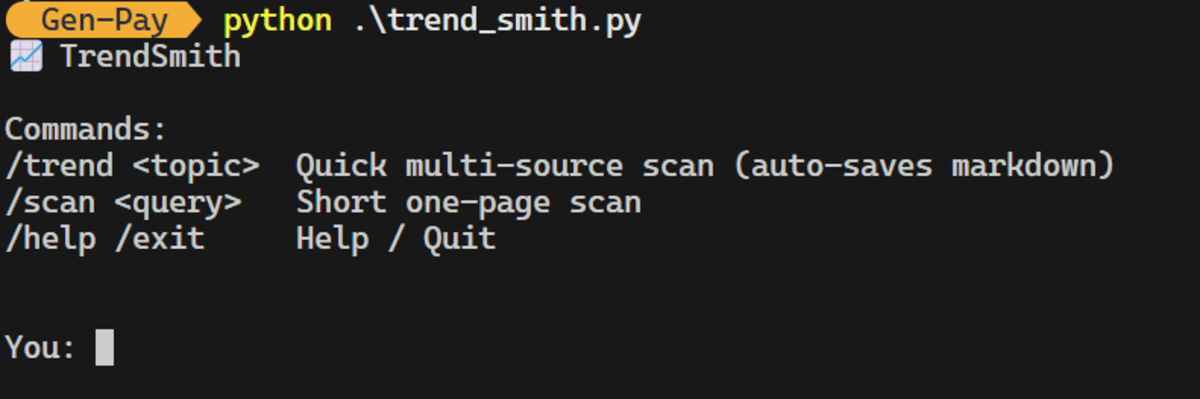
Image by Author
我们使用了 /trend 选项来搜索人工智能芯片初创公司。
/trend "AI chip startups"
结果是,该应用程序使用各种搜索和网页抓取工具从不同网站收集信息。
Image by Author
最终,它提供了完整的响应,自动将报告保存到 Markdown 文件中,并生成了使用情况摘要。其成本为 0.136 美元。
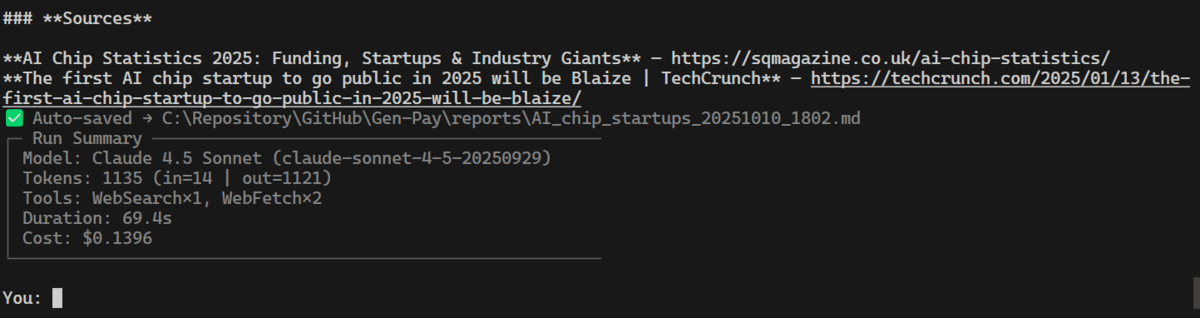
Image by Author
这是关于人工智能芯片初创公司的已保存 Markdown 报告的预览。
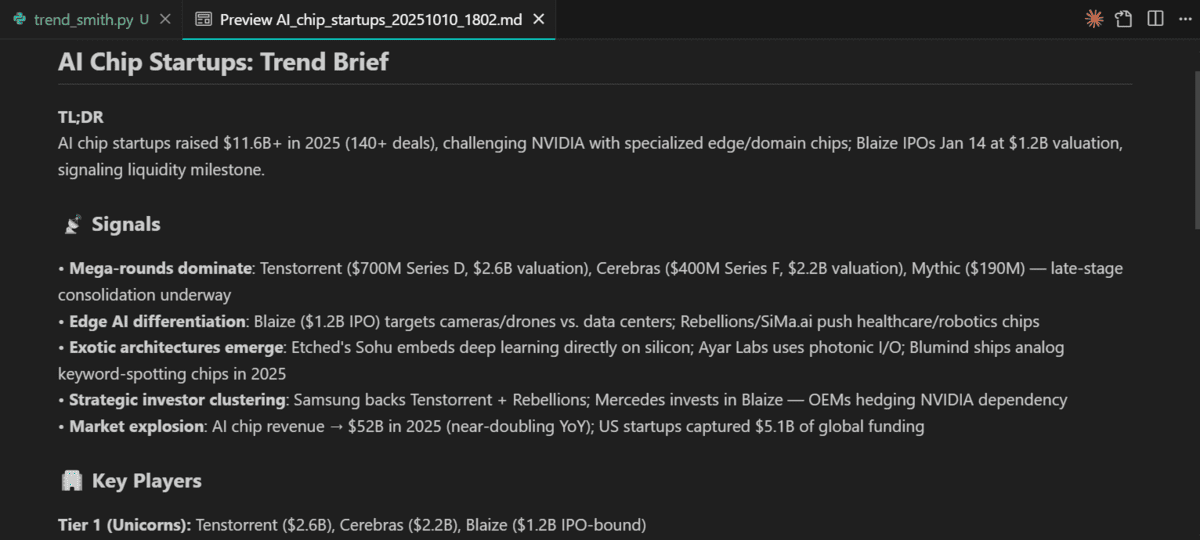
Image by Author
我们现在将测试扫描选项,并使用网络搜索生成关于该主题的摘要。
/scan Code CLI tools
它利用简单的网络搜索和抓取工具来生成关于该主题的简短摘要。
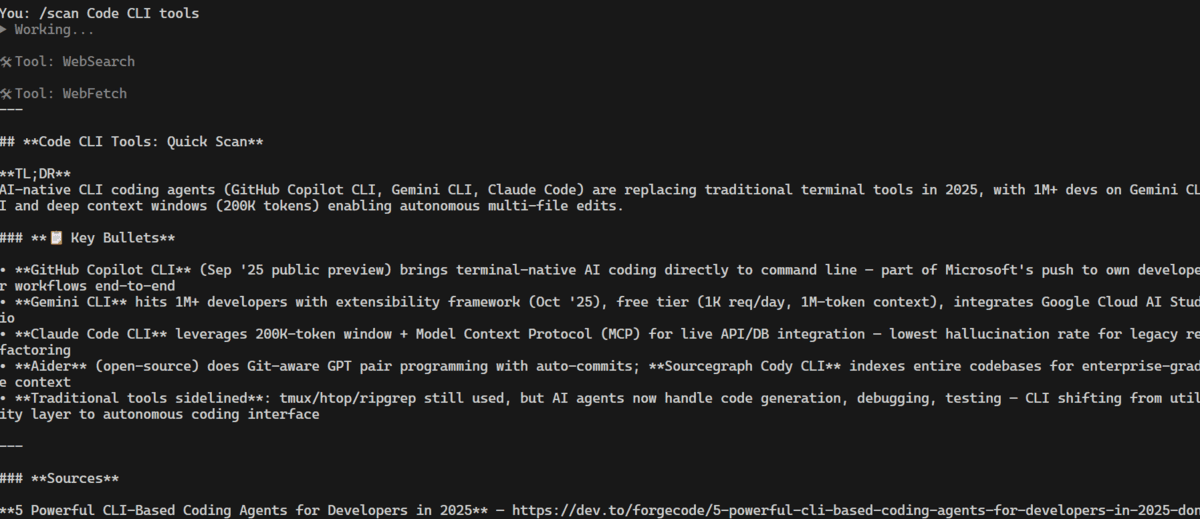
Image by Author
# 最后的想法
这个应用程序运行顺利,使用 Claude Agent SDK 的体验非常愉快。如果您已经在使用 Claude Code 计划,我强烈建议您尝试一下,将您日常的终端工作流程转变为可靠、可重复的 代理式 CLI。
您可以利用它来:
- 自动化常见的开发任务(调试、测试、部署)。
- 编写简单的分析或运维例程脚本。
- 将您的流程打包成一个可重用、可共享的工具。
对于那些需要 稳定性、可复现性 和 低胶水代码开销 的专业人士来说,这个 SDK 是一个很好的选择。当然,您甚至可以请 Claude Code 使用该 SDK 帮助您构建智能体应用程序本身。
Abid Ali Awan (@1abidaliawan) 是一位经过认证的数据科学家专业人士,热衷于构建机器学习模型。目前,他专注于内容创作和撰写有关机器学习和数据科学技术的技术博客。Abid 拥有技术管理硕士学位和电信工程学士学位。他的愿景是构建一个利用图神经网络帮助有心理健康困扰学生的 AI 产品。
🚀 想要体验更好更全面的AI调用?
欢迎使用青云聚合API,约为官网价格的十分之一,支持300+全球最新模型,以及全球各种生图生视频模型,无需翻墙高速稳定,文档丰富,小白也可以简单操作。
评论区