



📢 转载信息
原文作者:Shittu Olumide
在本文中,您将学习如何使用Unsloth和QLoRA,从数据集准备到训练、测试和比较,对开源大语言模型进行客户支持领域的微调。
我们将涵盖的主题包括:
- 设置Colab环境并安装所需的库。
- 准备和格式化用于指令微调的客户支持数据集。
- 使用LoRA适配器进行训练、保存、测试并与基础模型进行比较。
让我们开始吧。
引言
像Mistral 7B和Llama 3 8B这样的大语言模型(LLM)震撼了人工智能领域,但其通用性限制了它们在特定领域的应用。微调可以将这些通用模型转变为领域专家。对于客户支持而言,这意味着响应时间可减少85%,保持一致的品牌语调以及24/7全天候可用性。针对特定领域(如客户支持)微调LLM可以显著提高其在行业特定任务上的表现。
在本教程中,我们将学习如何使用客户支持问答数据集,对两个强大的开源模型——Mistral 7B和Llama 3 8B——进行微调。本教程结束时,您将学会如何:
- 使用Google Colab设置基于云的训练环境
- 准备和格式化客户支持数据集
- 使用量化低秩适配(QLoRA)微调Mistral 7B和Llama 3 8B
- 评估模型性能
- 保存和部署您的自定义模型
先决条件
为了充分利用本教程,您需要具备以下条件。
在您获得Hugging Face访问权限后,您需要申请访问以下2个受限模型:
- Mistral:
Mistral-7B-Instruct-v0.3 - Llama 3:
Meta-Llama-3-8B-Instruct
关于您在开始前应具备的必要知识,以下是简要概述:
- 基础Python编程知识
- 熟悉Jupyter笔记本
- 对机器学习概念的理解(有帮助但非必需)
- 基础命令行知识
您现在应该准备好开始了。
微调过程
微调是通过在特定领域数据上继续训练来使预训练的LLM适应特定任务的过程。与提示工程不同,微调会实际修改模型权重。
第 1 步:开始使用 Google Colab
- 访问 Google Colab
- 创建新笔记本:文件 → 新建笔记本
- 为其命名
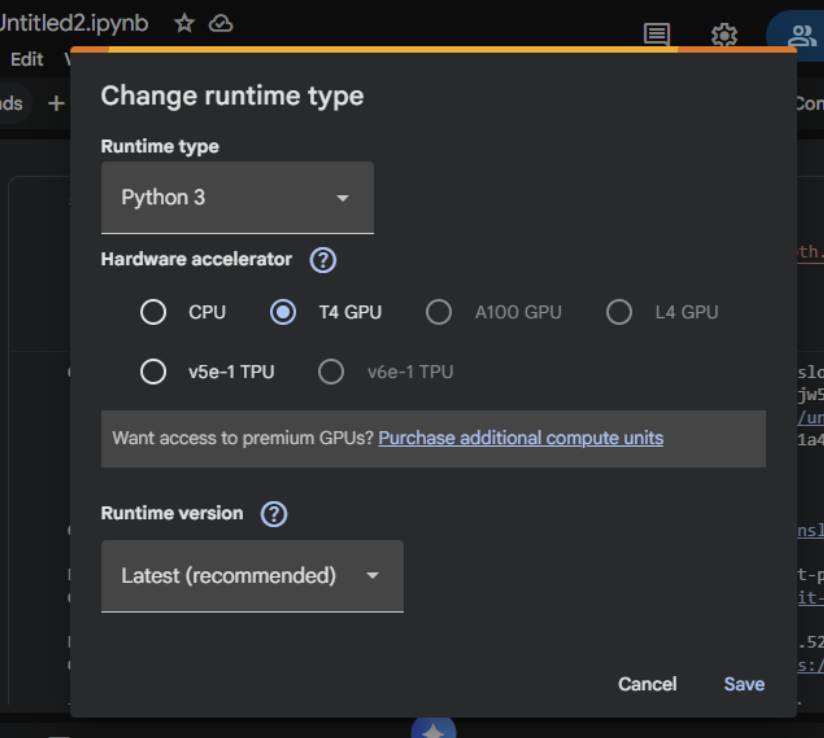
- 设置 GPU:运行时 → 更改运行时类型 → T4 GPU
第 2 步:安装 Unsloth(首先运行此项)
在这里,我们将安装Unsloth及其依赖项。Unsloth会自动处理CUDA设置。
!pip install "unsloth[colab-new] @ git+https://github.com/unslothai/unsloth.git" !pip install --no-deps xformers trl peft accelerate bitsandbytes print("Unsloth installed successfully!")第 3 步:导入 Unsloth 并设置
下一步是导入Unsloth并执行基本检查。
from unsloth import FastLanguageModel
import torch
from trl import SFTTrainer
from transformers import TrainingArguments
from datasets import Dataset
import pandas as pd
import numpy as np

print("Unsloth loaded successfully!")
print(f"PyTorch: {torch.__version__}")
print(f"CUDA: {torch.cuda.is_available()}")
print(f"GPU: {torch.cuda.get_device_name(0) if torch.cuda.is_available() else 'None'}")
第 4 步:创建客户支持数据集
在这一部分,我们将提供真实的客户支持数据用于模型的微调。
print("Creating customer support Q&A dataset...")
# Create realistic customer support data
customer_support_data = [
    {
        "instruction": "You are a helpful customer support agent. Answer clearly and professionally.",
        "input": "How do I reset my password?",
        "output": "To reset your password: 1) Click 'Forgot Password' on the login page 2) Enter your registered email 3) Check your inbox for the reset link 4) Click the link and create a new password. Check your spam folder if not received within 5 minutes."
    },
    {
        "instruction": "You are a helpful customer support agent. Answer clearly and professionally.",
        "input": "My payment was declined, what should I do?",
        "output": "Common solutions: 1) Check that the card has sufficient funds 2) Ensure the card is not expired 3) Contact your bank to unblock the transaction 4) Try an alternative payment method like PayPal 5) Wait 24 hours before retrying."
    },
    {
        "instruction": "You are a helpful customer support agent. Answer clearly and professionally.",
        "input": "How do I cancel my subscription?",
        "output": "To cancel: 1) Log in to your account 2) Go to 'Billing & Subscriptions' 3) Click 'Cancel Subscription' 4) Confirm cancellation. Your access continues until the end of the billing period. No partial refunds."
    },
    {
        "instruction": "You are a helpful customer support agent. Answer clearly and professionally.",
        "input": "The app keeps crashing on startup",
        "output": "Troubleshooting steps: 1) Update the app to the latest version 2) Restart your device 3) Clear the app cache/data 4) Reinstall the app 5) Ensure 500MB free storage 6) Update your device OS. If it persists, contact support with error logs."
    },
    {
        "instruction": "You are a helpful customer support agent. Answer clearly and professionally.",
        "input": "Where is my order tracking information?",
        "output": "You can find tracking: 1) Check the confirmation email 2) Log into your account > Orders 3) Click the tracking number. Standard shipping: 3-5 business days. Contact the carrier with the tracking number for the exact location."
    },
    {
        "instruction": "You are a helpful customer support agent. Answer clearly and professionally.",
        "input": "How do I contact customer support?",
        "output": "Support options: 1) Live chat: Mon–Fri 9AM–6PM EST 2) Email: support@company.com (response within 24h) 3) Phone: 1-800-123-4567 4) Twitter: @CompanySupport. Please have your account email ready."
    },
    {
        "instruction": "You are a helpful customer support agent. Answer clearly and professionally.",
        "input": "Can I get a refund?",
        "output": "Refund policy: 1) Digital products: Refund within 14 days if not used 2) Subscriptions: No refunds for partial months 3) Physical goods: Return within 30 days with receipt. Contact billing@company.com with your order ID."
    },
    {
        "instruction": "You are a helpful customer support agent. Answer clearly and professionally.",
        "input": "How do I change my email address?",
        "output": "To change your email: 1) Log in to your account 2) Go to Account Settings 3) Click 'Change Email' 4) Enter the new email 5) Verify via the confirmation email sent to the new address. The update takes effect immediately."
    },
    {
        "instruction": "You are a helpful customer support agent. Answer clearly and professionally.",
        "input": "Is my data secure?",
        "output": "Yes, we use: 1) AES-256 encryption 2) SSL/TLS for all connections 3) Regular security audits 4) GDPR compliance 5) Data is never sold to third parties. Read our privacy policy for details."
    },
    {
        "instruction": "You are a helpful customer support agent. Answer clearly and professionally.",
        "input": "Do you offer student discounts?",
        "output": "Yes! Student discount: 50% off. Requirements: 1) Valid .edu email OR 2) Student ID photo. Apply: Email student@company.com with proof. The discount is applied after verification."
    },
]
您可以复制并修改更多样本来创建更多数据。
expanded_data = []
for item in customer_support_data * 30: # Creates 300 samples
    expanded_data.append(item.copy())
现在,我们可以将其转换为数据集:
# Convert to dataset
dataset = Dataset.from_pandas(pd.DataFrame(expanded_data))
print(f"Dataset created: {len(dataset)} samples")
print(f"Sample:\n{dataset[0]}")
第 5 步:选择您的模型(Mistral 或 Llama 3)
我们将在此演练中使用Mistral 7B。
model_name = "unsloth/mistral-7b"
print(f"Selected: {model_name}")
print("Loading model (takes 2-5 minutes)...")
第 6 步:使用 Unsloth 加载模型(快 4 倍!)
max_seq_length = 1024
dtype = torch.float16
load_in_4bit = True
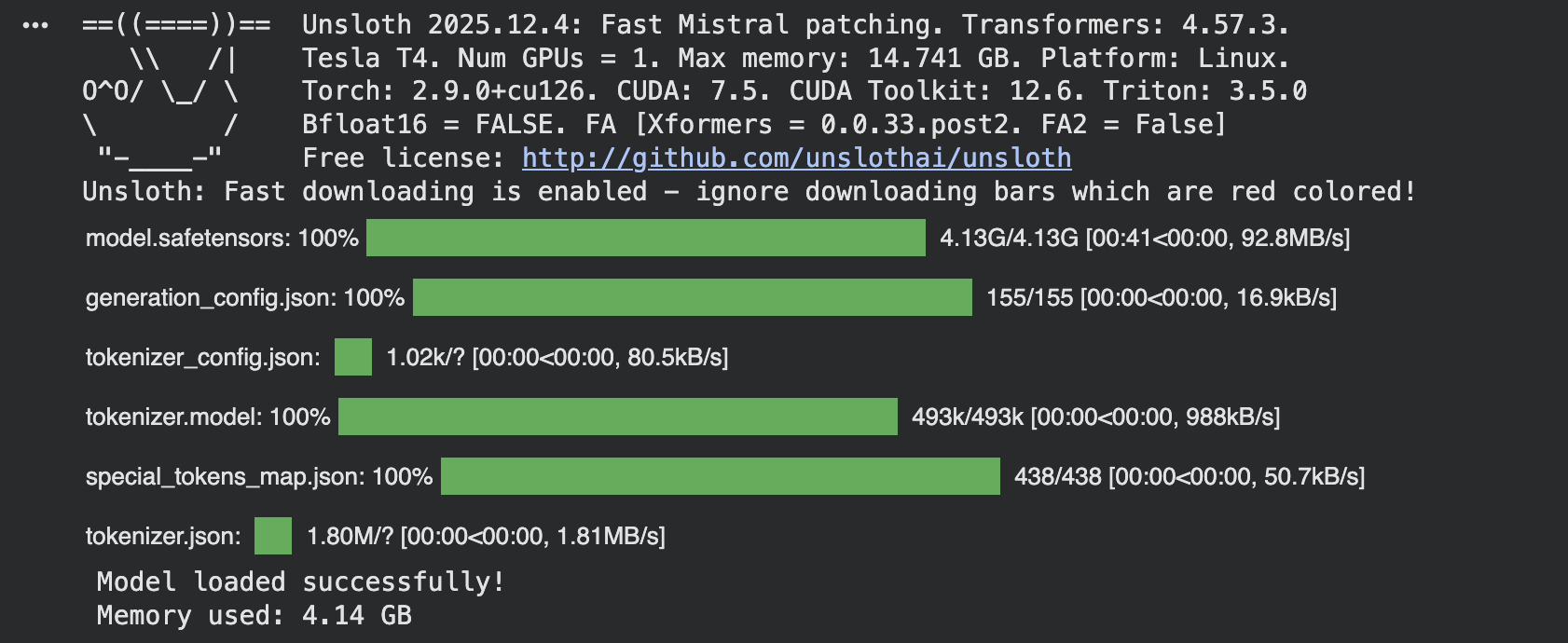
加载模型时使用Unsloth优化,如果您有受限模型如Llama 3,请使用 token = “hf_…”。
model, tokenizer = FastLanguageModel.from_pretrained(
    model_name=model_name,
    max_seq_length=max_seq_length,
    dtype=dtype,
    load_in_4bit=load_in_4bit,
)

print("Model loaded successfully!")
if torch.cuda.is_available():
print(f"Memory used: {torch.cuda.memory_allocated() / 1e9:.2f} GB")load_in_4bit量化可以节省内存。使用float16可以加快训练速度,您可以将max_seq_length增加到2048以获得更长的响应。
第 7 步:添加 LoRA 适配器(Unsloth 优化)
对于大多数用例,推荐使用LoRA,因为它内存效率高且速度快:
model = FastLanguageModel.get_peft_model(
    model,
    r=16,
    target_modules=["q_proj", "k_proj", "v_proj", "o_proj", "gate_proj", "up_proj", "down_proj"],
    lora_alpha=16,
    lora_dropout=0,
    bias="none",
    use_gradient_checkpointing="unsloth",
    random_state=3407,
    use_rslora=False,
    loftq_config=None,
)
print("LoRA adapters added!")
print("Trainable parameters added: Only ~1% of total parameters!")
🚀 想要体验更好更全面的AI调用?
欢迎使用青云聚合API,约为官网价格的十分之一,支持300+全球最新模型,以及全球各种生图生视频模型,无需翻墙高速稳定,文档丰富,小白也可以简单操作。
评论区