



📢 转载信息
原文作者:Kosti Vasilakakis, Ranjit Rajan, Abdullahi Olaoye, Abhishek Sawarkar, Sagar Murthy, and Chris Smith
本文由 NVIDIA 的 Ranjit Rajan、Abdullahi Olaoye 和 Abhishek Sawarkar 共同撰写。
AI 的下一个前沿领域不仅仅是更智能的聊天助手,而是能够在整个系统上进行推理、规划和执行的自主智能体。要实现这一目标,企业级开发人员需要从原型转向可安全扩展的、可投入生产的 AI 智能体。随着企业问题的日益复杂,这一挑战也随之增加,需要多专业智能体协作以完成复杂任务的架构。
在开发中构建 AI 智能体与大规模部署它们有着根本性的不同。开发人员在原型和生产之间面临着鸿沟,在性能优化、资源扩展、安全实施和操作监控方面举步维艰。典型的方法使团队在多个不相关的工具和框架之间左右为难,使得从开发到部署保持一致性并获得最佳性能变得困难。这就是 Strands Agents、Amazon Bedrock AgentCore 和 NVIDIA NeMo Agent Toolkit 强大组合大放异彩的地方。您可以将这些工具结合使用,以设计复杂的多智能体系统,进行编排,并在生产中安全地扩展它们,同时提供内置的可观测性、智能体评估、性能分析和性能优化。本文演示了如何使用这一集成解决方案,从初始开发到生产部署,在 Amazon Web Services (AWS) 上构建、评估、优化和部署 AI 智能体。
企业级智能体的基础
开源的 Strands Agents 框架通过其模型驱动方法简化了 AI 智能体开发。开发人员使用三个组件来创建智能体:
- 基础模型 (FMs),例如 Amazon Nova、Anthropic 的 Claude 和 Meta 的 Llama
- 工具(内置超过 20 个,还可通过 Python 装饰器支持自定义工具)
- 指导智能体行为的提示词。
该框架包含与 AWS 服务(如 Amazon Bedrock 和 Amazon Simple Storage Service (Amazon S3))的内置集成、本地测试支持、持续集成和持续开发 (CI/CD) 工作流、多种部署选项以及 OpenTelemetry 可观测性。
Amazon Bedrock AgentCore 是一个智能体平台,用于安全、大规模地构建、部署和运营有效的智能体。它具有可组合的、完全托管的服务:
- 用于安全、无服务器智能体部署的运行时 (Runtime)
- 用于短期和长期上下文保留的内存 (Memory)
- 用于安全工具访问的网关 (Gateway),它将 API 和 AWS Lambda 函数转换为智能体兼容的工具,并连接到现有的 Model Context Protocol (MCP) 服务器
- 用于安全智能体身份和访问管理的身份 (Identity)
- 用于在沙箱环境中安全执行代码的代码解释器 (Code Interpreter)
- 用于快速、安全 Web 交互的浏览器 (Browser)
- 用于全面操作洞察以跟踪、调试和监控智能体性能的可观测性 (Observability)
- 用于根据真实行为持续检查智能体质量的评估 (Evaluations)
- 用于将智能体保持在定义边界内的策略 (Policy)
这些服务可以独立或协同工作,它们抽象了构建、部署和操作复杂智能体的复杂性,同时与开源框架或模型协同工作,提供企业级的安全性和可靠性。
使用 NeMo Agent Toolkit 进行智能体评估、性能分析和优化
NVIDIA NeMo Agent Toolkit 是一个开源框架,旨在帮助开发人员构建、分析和优化 AI 智能体,无论其底层框架如何。其框架无关的方法意味着它可以与 Strands Agents、LangChain、LlamaIndex、CrewAI 和自定义企业框架无缝协作。此外,当不同的框架连接到 NeMo Agent Toolkit 时,它们可以互操作。
该工具包的性能分析器 (profiler) 提供了完整的智能体工作流分析,跟踪单个智能体和工具的 token 使用量、计时、工作流特定延迟、吞吐量和运行时间,从而实现有针对性的性能改进。它建立在工具包的评估工具 (evaluation harness) 之上,包括用于 Retrieval Augmented Generation (RAG) 的特定评估器(如答案准确性、上下文相关性、响应基础性和智能体轨迹),并支持用于专业用例的自定义评估器,从而实现有针对性的性能优化。自动超参数优化器会分析并系统地发现 temperature、top_p 和 max_tokens 等参数的最佳设置,同时最大限度地提高准确性、基础性、上下文相关性,最大限度地减少 token 使用量和延迟,并优化其他自定义指标。这种自动化方法会分析您的完整智能体工作流、确定的瓶颈,并发现手动调整可能会遗漏的最佳参数组合。该工具包的智能 GPU 规模计算器通过模拟智能体延迟和并发场景并预测生产部署所需的精确 GPU 基础设施,减轻了猜测的负担。
该工具包的可观测性集成与流行的监控服务(包括 Arize Phoenix、Weights & Biases Weave、Langfuse 和支持 OpenTelemetry 的系统(如 Amazon Bedrock AgentCore 可观测性)连接,为持续优化和维护创建了持续的反馈循环。
实际实现
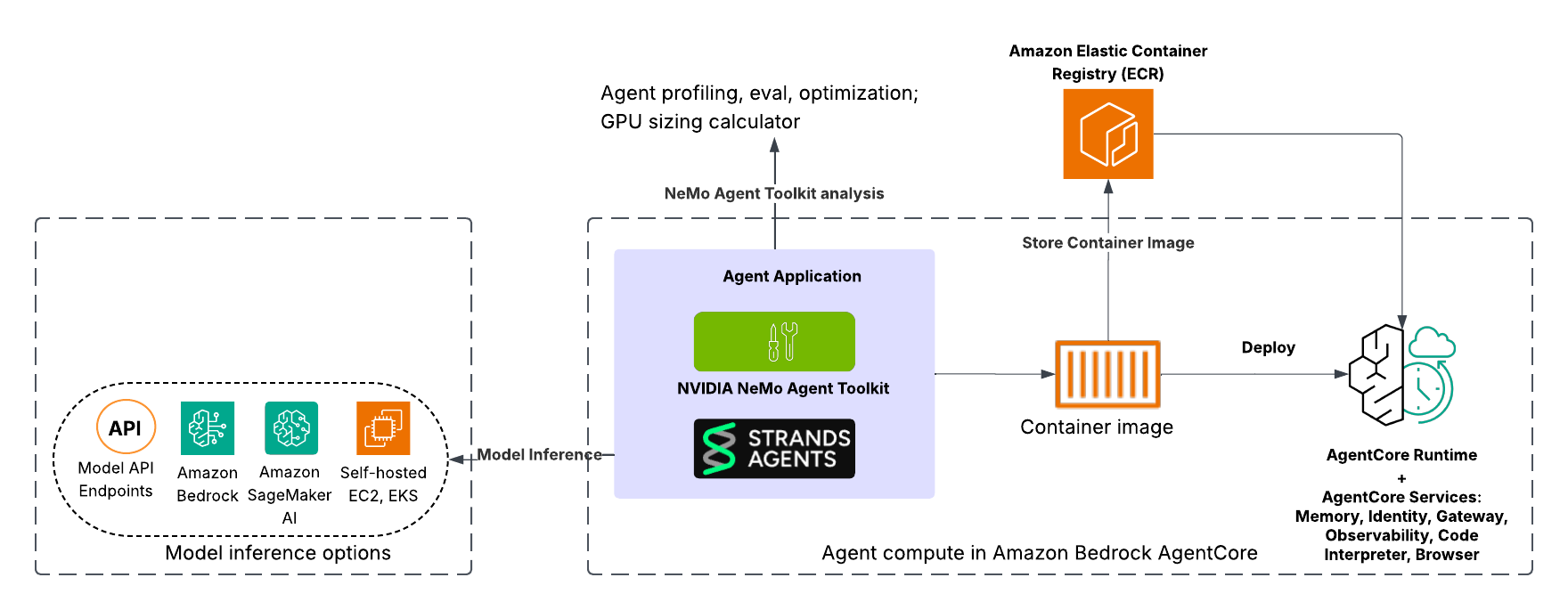
本示例演示了一个基于知识的智能体,它从 Web URL 检索和综合信息以回答用户查询。该解决方案使用集成了 NeMo Agent Toolkit 的 Strands Agents 构建,并为在 Amazon Bedrock AgentCore Runtime 中快速部署而容器化,并利用 AgentCore 服务(如 AgentCore 可观测性)。此外,开发人员可以灵活地与 Amazon Bedrock 中的完全托管模型、Amazon SageMaker AI 中托管的模型、Amazon Elastic Kubernetes Service (Amazon EKS) 中容器化的模型或其他模型 API 端点集成。整体架构旨在实现从智能体定义和优化到容器化和可扩展部署的简化工作流。
下图说明了使用 Strands Agents 构建并集成 NeMo Agent Toolkit 部署在 Amazon Bedrock AgentCore 中的智能体架构。
智能体开发和评估
首先在 Strands Agents 中定义您的智能体和工作流,然后用 NeMo Agent Toolkit 包装它,以配置组件,例如用于推理和工具的大型语言模型 (LLM)。有关详细的设置指南,请参阅 GitHub 中 Strands Agents 和 NeMo Agent Toolkit 集成示例。配置环境后,通过使用示例提示词从命令行运行单个工作流来验证智能体逻辑:
nat run --config_file examples/frameworks/strands_demo/configs/config.yml --input "How do I use the Strands Agents API?"以下是截断的终端输出:
Workflow Result: ['The Strands Agents API is a flexible system for managing prompts, including both system prompts and user messages. System prompts provide high-level instructions to the model about its role, capabilities, and constraints, while user messages are your queries or requests to the agent. The API supports multiple techniques for prompting, including text prompts, multi-modal prompts, and direct tool calls. For guidance on how to write safe and responsible prompts, please refer to the Safety & Security - Prompt Engineering documentation.'] 为了模拟真实场景,而不是执行单个工作流然后退出,您可以使用 serve 命令启动一个能够处理并发请求的长期运行的 API 服务器:
nat serve --config_file examples/frameworks/strands_demo/configs/config.yml
以下是截断的终端输出:
INFO: Application startup complete. INFO: Uvicorn running on http://localhost:8000 (Press CTRL+C to quit) 智能体现在本地端口 8000 上运行。要与智能体交互,请打开一个新的终端并执行以下 cURL 命令。这将生成与前一个 nat run 步骤类似但智能体作为持久服务连续运行而不是执行一次就退出的输出。这模拟了生产环境中 Amazon Bedrock AgentCore 将作为容器化服务运行智能体的情况:
curl -X 'POST' 'http://localhost:8080/invocations' -H 'accept: application/json' -H 'Content-Type: application/json' -d '{"inputs" : "How do I use the Strands Agents API?"}'curl -X 'POST' 'http://localhost:8000/generate' -H 'accept: application/json' -H 'Content-Type: application/json' -d '{"inputs" : "How do I use the Strands Agents API?"}' 以下是截断的终端输出:
{"value":"The Strands Agents API provides a flexible system for managing prompts, including both system prompts and user messages. System prompts provide high-level instructions to the model about its role, capabilities, and constraints, while user messages are your queries or requests to the agent. The SDK supports multiple techniques for prompting, including text prompts, multi-modal prompts, and direct tool calls. For guidance on how to write safe and responsible prompts, please refer to the Safety & Security - Prompt Engineering documentation."} 智能体性能分析和工作流性能监控
智能体运行后,下一步是建立性能基线。为了说明可获得的见解深度,在此示例中,我们在由 NVIDIA A100 Tensor Core GPU(8xA100 80 GB GPU)驱动的 Amazon EC2 P4de.24xlarge 实例上使用了自托管的Llama 3.3 70B Instruct NIM,该实例运行在 Amazon EKS 上。我们使用 nat eval 命令来评估智能体并生成分析:
nat eval --config_file examples/frameworks/strands_demo/configs/eval_config.yml
以下是截断的终端输出:
Evaluating Trajectory: 100%|████████████████████████████████████████████████████████████████████| 10/10 [00:10<00:00, 1.00s/it] 2025-11-24 16:59:18 - INFO - nat.profiler.profile_runner:127 - Wrote combined data to: .tmp/nat/examples/frameworks/strands_demo/eval/all_requests_profiler_traces.json 2025-11-24 16:59:18 - INFO - nat.profiler.profile_runner:146 - Wrote merged standardized DataFrame to .tmp/nat/examples/frameworks/strands_demo/eval/standardized_data_all.csv 2025-11-24 16:59:18 - INFO - nat.profiler.profile_runner:200 - Wrote inference optimization results to: .tmp/nat/examples/frameworks/strands_demo/eval/inference_optimization.json 2025-11-24 16:59:28 - INFO - nat.profiler.profile_runner:224 - Nested stack analysis complete 2025-11-24 16:59:28 - INFO - nat.profiler.profile_runner:235 - Concurrency spike analysis complete 2025-11-24 16:59:28 - INFO - nat.profiler.profile_runner:264 - Wrote workflow profiling report to: .tmp/nat/examples/frameworks/strands_demo/eval/workflow_profiling_report.txt 2025-11-24 16:59:28 - INFO - nat.profiler.profile_runner:271 - Wrote workflow profiling metrics to: .tmp/nat/examples/frameworks/strands_demo/eval/workflow_profiling_metrics.json 2025-11-24 16:59:28 - INFO - nat.eval.evaluate:345 - Workflow output written to .tmp/nat/examples/frameworks/strands_demo/eval/workflow_output.json 2025-11-24 16:59:28 - INFO - nat.eval.evaluate:356 - Evaluation results written to .tmp/nat/examples/frameworks/strands_demo/eval/rag_relevance_output.json 2025-11-24 16:59:28 - INFO - nat.eval.evaluate:356 - Evaluation results written to .tmp/nat/examples/frameworks/strands_demo/eval/rag_groundedness_output.json 2025-11-24 16:59:28 - INFO - nat.eval.evaluate:356 - Evaluation results written to .tmp/nat/examples/frameworks/strands_demo/eval/rag_accuracy_output.json 2025-11-24 16:59:28 - INFO - nat.eval.evaluate:356 - Evaluation results written to .tmp/nat/examples/frameworks/strands_demo/eval/trajectory_accuracy_output.json 2025-11-24 16:59:28 - INFO - nat.eval.utils.output_uploader:62 - No S3 config provided; skipping upload. 该命令生成详细的工件,包括每个评估指标(如准确性、基础性、相关性和轨迹准确性)的 JSON 文件,显示 0–1 的分数、推理轨迹、检索到的上下文和聚合平均值。工件中包含的其他信息包括工作流输出、标准化表格、性能分析跟踪和延迟与 token 效率的紧凑摘要。这种多指标扫描提供了关于智能体质量和行为的整体视图。评估突出显示,虽然智能体实现了始终如一的基础性得分——意味着答案可靠地得到了来源支持——但检索相关性仍有改进空间。性能分析跟踪输出了工作流特定的延迟、吞吐量和运行时(在 90%、95% 和 99% 置信区间)。该命令生成智能体流程的甘特图和嵌套堆栈分析,以精确定位瓶颈所在位置,如下所示。它还报告并发峰值和 token 效率,以便您可以准确了解扩展如何影响提示和完成的使用情况。
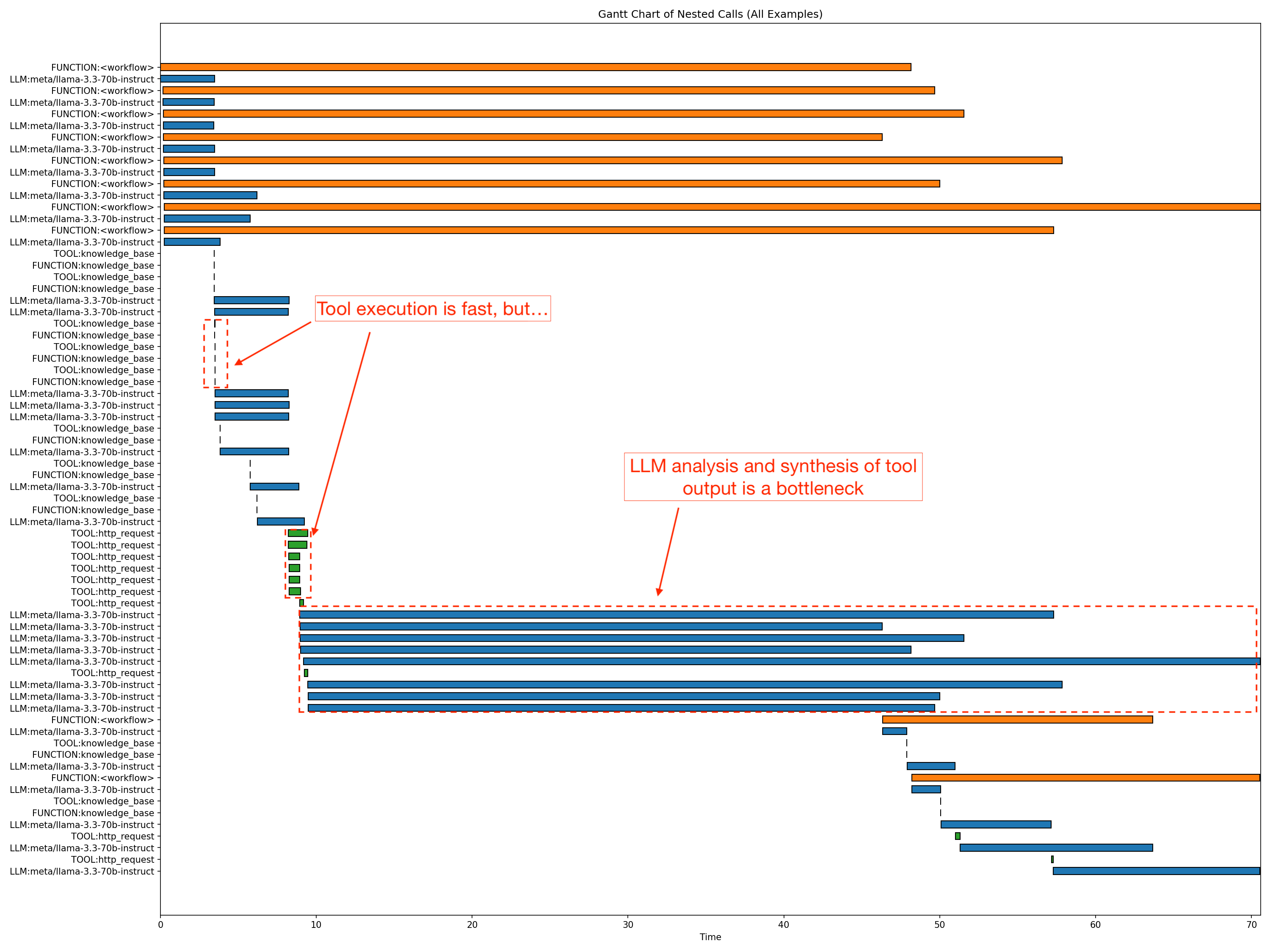
在性能分析期间,nat 启动了八个并发智能体工作流(在图表中以橙色条显示),这是评估期间的默认并发配置。所显示工作流的 p90 延迟大约为 58.9 秒。至关重要的是,数据显示响应生成是主要的瓶颈,最长的 LLM 部分大约需要 61.4 秒。同时,非 LLM 开销保持在最低水平。HTTP 请求平均仅为 0.7–1.2 秒,知识库访问微不足道。利用这种粒度级别,您可以识别并优化智能体工作流中的特定瓶颈。
智能体性能优化
性能分析后,请调整智能体的参数以平衡质量、性能和成本。手动调整 LLM 设置(如 temperature 和 top_p)通常是一种猜测游戏。NeMo Agent Toolkit 将其转变为一门数据驱动的科学。您可以使用内置的优化器对参数搜索空间进行系统扫描:
nat optimize --config_file examples/frameworks/strands_demo/configs/optimizer_config.yml
以下是截断的终端输出:
Evaluating Trajectory: 100%|██████████████████████████████████████████████████████████████| 10/10 [00:10<00:00, 1.00it/s] 2025-10-31 16:50:41 - INFO - nat.profiler.profile_runner:127 - Wrote combined data to: ./tmp/nat/strands_demo/eval/all_requests_profiler_traces.json 2025-10-31 16:50:41 - INFO - nat.profiler.profile_runner:146 - Wrote merged standardized DataFrame to: ./tmp/nat/strands_demo/eval/standardized_data_all.csv 2025-10-31 16:50:41 - INFO - nat.profiler.profile_runner:208 - Wrote inference optimization results to: ./tmp/nat/strands_demo/eval/inference_optimization.json 2025-10-31 16:50:41 - INFO - nat.eval.evaluate:337 - Workflow output written to ./tmp/nat/strands_demo/eval/workflow_output.json 2025-10-31 16:50:41 - INFO - nat.eval.evaluate:348 - Evaluation results written to ./tmp/nat/strands_demo/eval/token_efficiency_output.json 2025-10-31 16:50:41 - INFO - nat.eval.evaluate:348 - Evaluation results written to ./tmp/nat/strands_demo/eval/llm_latency_output.json 2025-10-31 16:50:41 - INFO - nat.eval.evaluate:348 - Evaluation results written to ./tmp/nat/strands_demo/eval/rag_relevance_output.json 2025-10-31 16:50:41 - INFO - nat.eval.evaluate:348 - Evaluation results written to ./tmp/nat/strands_demo/eval/rag_groundedness_output.json 2025-10-31 16:50:41 - INFO - nat.eval.evaluate:348 - Evaluation results written to ./tmp/nat/strands_demo/eval/rag_accuracy_output.json 2025-10-31 16:50:41 - INFO - nat.eval.evaluate:348 - Evaluation results written to ./tmp/nat/strands_demo/eval/trajectory_accuracy_output.json 2025-10-31 16:50:41 - INFO - nat.eval.utils.output_uploader:61 - No S3 config provided; skipping upload. Evaluating Regex-Ex_Accuracy: 100%|████████████████████████████████████████████████████████| 10/10 [00:21<00:00, 2.15s/it] 2025-10-31 16:50:44 - INFO - nat.profiler.profile_runner:127 - Wrote combined data to: ./tmp/nat/strands_demo/eval/all_requests_profiler_traces.json 2025-10-31 16:50:44 - INFO - nat.profiler.profile_runner:146 - Wrote merged standardized DataFrame to: ./tmp/nat/strands_demo/eval/standardized_data_all.csv 2025-10-31 16:50:45 - INFO - nat.profiler.profile_runner:208 - Wrote inference optimization results to: ./tmp/nat/strands_demo/eval/inference_optimization.json 2025-10-31 16:50:46 - INFO - nat.eval.evaluate:337 - Workflow output written to ./tmp/nat/strands_demo/eval/workflow_output.json 2025-10-31 16:50:47 - INFO - nat.eval.evaluate:348 - Evaluation results written to ./tmp/nat/strands_demo/eval/token_efficiency_output.json 2025-10-31 16:50:48 - INFO - nat.eval.evaluate:348 - Evaluation results written to ./tmp/nat/strands_demo/eval/llm_latency_output.json 2025-10-31 16:50:49 - INFO - nat.eval.evaluate:348 - Evaluation results written to ./tmp/nat/strands_demo/eval/rag_relevance_output.json 2025-10-31 16:50:50 - INFO - nat.eval.evaluate:348 - Evaluation results written to ./tmp/nat/strands_demo/eval/rag_groundedness_output.json 2025-10-31 16:50:51 - INFO - nat.eval.evaluate:348 - Evaluation results written to ./tmp/nat/strands_demo/eval/trajectory_accuracy_output.json 2025-10-31 16:50:52 - INFO - nat.eval.evaluate:348 - Evaluation results written to ./tmp/nat/strands_demo/eval/rag_accuracy_output.json 2025-10-31 16:50:53 - INFO - nat.eval.utils.output_uploader:61 - No S3 config provided; skipping upload. [I 2025-10-31 16:50:53,361] Trial 19 finished with values: [0.6616666666666667, 1.0, 0.38000000000000007, 0.26800000000000006, 2.1433333333333333, 2578.222222222222] and parameters: {'llm_sim_llm.top_p': 0.8999999999999999, 'llm_sim_llm.temperature': 0.38000000000000006, 'llm_sim_llm.max_tokens': 5632}. 2025-10-31 16:50:53 - INFO - nat.profiler.parameter_optimization.parameter_optimizer:120 - Numeric optimization finished 2025-10-31 16:50:53 - INFO - nat.profiler.parameter_optimization.parameter_optimizer:162 - Generating Pareto front visualizations... 2025-10-31 16:50:53 - INFO - nat.profiler.parameter_optimization.pareto_visualizer:320 - Creating Pareto front visualizations... 2025-10-31 16:50:53 - INFO - nat.profiler.parameter_optimization.pareto_visualizer:330 - Total trials: 20 2025-10-31 16:50:53 - INFO - nat.profiler.parameter_optimization.pareto_visualizer:331 - Pareto optimal trials: 14 2025-10-31 16:50:54 - INFO - nat.profiler.parameter_optimization.pareto_visualizer:345 - Parallel coordinates plot saved to: ./tmp/nat/strands_demo/optimizer/plots/pareto_parallel_coordinates.png 2025-10-31 16:50:56 - INFO - nat.profiler.parameter_optimization.pareto_visualizer:374 - Pairwise matrix plot saved to: ./tmp/nat/strands_demo/optimizer/plots/pareto_pairwise_matrix.png 2025-10-31 16:50:56 - INFO - nat.profiler.parameter_optimization.pareto_visualizer:387 - Visualization complete! 2025-10-31 16:50:56 - INFO - nat.profiler.parameter_optimization.pareto_visualizer:389 - Plots saved to: ./tmp/nat/strands_demo/optimizer/plots 2025-10-31 16:50:56 - INFO - nat.profiler.parameter_optimization.parameter_optimizer:171 - Pareto visualizations saved to: ./tmp/nat/strands_demo/optimizer/plots 2025-10-31 16:50:56 - INFO - nat.profiler.parameter_optimization.optimizer_runtime:88 - All optimization phases complete. 该命令启动跨关键 LLM 参数(如 temperature、top_p 和 max_tokens)的自动化扫描,如配置中定义(在本例中为 optimizer_config.yml)的搜索空间所示:
llms:
  nim_llm:
    _type: nim
    model_name: meta/llama-3.3-70b-instruct
    temperature: 0.5
    top_p: 0.9
    max_tokens: 4096
    # Enable optimization for these parameters
    optimizable_params:
    - temperature
    - top_p
    - max_tokens
    # Define search spaces
    search_space:
      temperature:
        low: 0.1
        high: 0.7
        step: 0.2 # Tests: 0.1, 0.3, 0.5, 0.7
      top_p:
        low: 0.7
        high: 1.0
        step: 0.1 # Tests: 0.7, 0.8, 0.9, 1.0
      max_tokens:
        low: 4096
        high: 8192
        step: 512 # Tests: 4096, 4608, 5120, 5632, 6144, 6656, 7168, 7680, 8192
在此示例中,NeMo Agent Toolkit Optimize 系统地评估了参数配置,并确定 temperature ≈ 0.7、top_p ≈ 1.0 和 max_tokens ≈ 6k (6144) 是最佳配置,在 20 次试验中产生了最高的准确性。此配置与基线(使用 8192 的 max_tokens 设置)相比,准确性提高了 35%,同时实现了 20% 的 token 效率提升——最大限度地提高了这些生产部署的性能和成本效益。
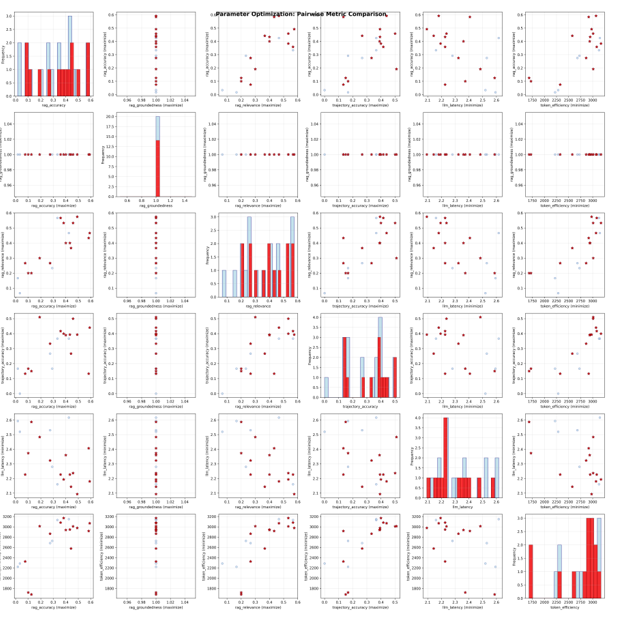
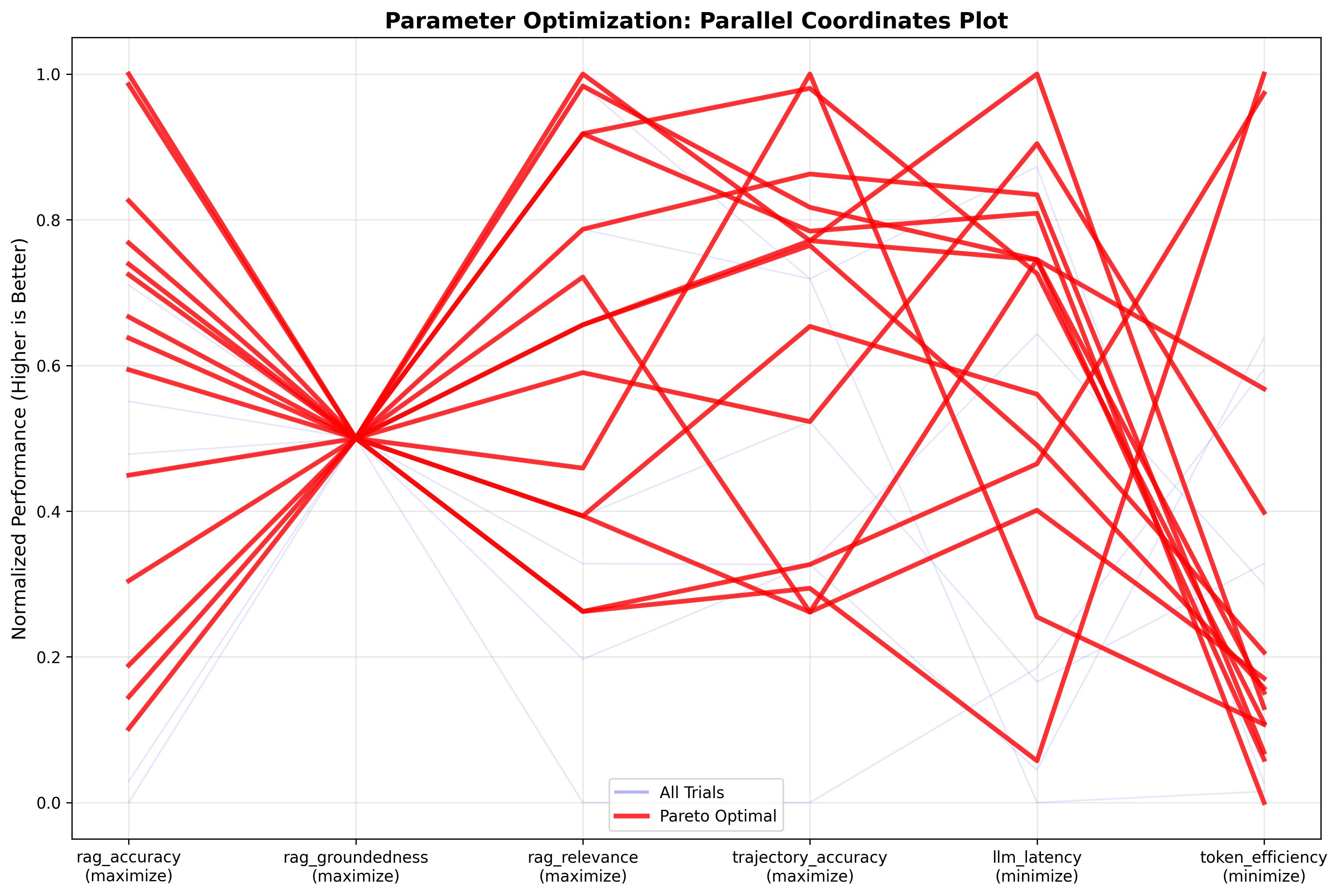
优化器会绘制成对的 Pareto 曲线,如下所示的成对矩阵比较图,以分析不同参数之间的权衡。在矩阵比较图之后的并行坐标图中,最佳试验(红线)在准确性、基础性和相关性方面实现了高分(0.8–1.0),同时在 token 使用量和延迟降至 0.6–0.8 的标准化刻度时,牺牲了一些效率。成对矩阵证实了质量指标之间存在很强的相关性,并显示实际的 token 消耗在所有试验中紧密集中在 2,500–3,100 个 token 左右。这些结果表明,通过提示工程可能可以进一步提高准确性和 token 效率。这是开发团队可以使用 NeMo Agent Toolkit 的提示优化功能实现的,有助于在最大限度提高性能的同时降低成本。
下图显示了成对矩阵比较:
下图显示了并行坐标图:
调整生产 GPU 基础设施规模
优化智能体并确定运行时或推理配置后,您可以将重点转移到评估模型部署基础设施上。如果您在 EC2 GPU 驱动的实例集群上自托管模型部署,将智能体投入生产最困难的方面之一是准确预测支持目标用例和并发用户所需的计算资源,同时不超出预算或导致超时。NeMo Agent Toolkit GPU 规模计算器通过使用智能体的实际性能剖析来确定支持特定服务水平目标 (SLO) 的最佳集群规模,解决了这一挑战,从而实现了缓解性能与成本之间权衡的正确规模调整。要生成规模分析,您可以在一系列并发级别(例如,1–32 个同时用户)上运行规模计算器:
nat sizing calc --config_file examples/frameworks/strands_demo/configs/sizing_config.yml --calc_output_dir /tmp/strands_demo/sizing_calc_run1/ --concurrencies 1,2,4,8,12,20,24,28,32 --num_passes 2在 Amazon EKS 上运行的由 NVIDIA A100 Tensor Core GPU 驱动的Llama 3.3 70B Instruct NIM 的参考 EC2 P4de.24xlarge 实例上执行此操作,得出了以下容量分析:
Per concurrency results: Alerts!: W = Workflow interrupted, L = LLM latency outlier, R = Workflow runtime outlier | Alerts | Concurrency | p95 LLM Latency | p95 WF Runtime | Total Runtime | |--------|--------------|-----------------|----------------|---------------| | | 1 | 11.8317 | 21.3647 | 33.2416 | | | 2 | 19.3583 | 26.2694 | 36.931 | | | 4 | 25.728 | 32.4711 | 61.13 | | | 8 | 38.314 | 57.1838 | 89.8716 | | | 12 | 55.1766 | 72.0581 | 130.691 | | | 20 | 103.68 | 131.003 | 202.791 | | !R | 24 | 135.785 | 189.656 | 221.721 | | !R | 28 | 125.729 | 146.322 | 245.654 | | | 32 | 169.057 | 233.785 | 293.562 | 如下表所示,计算出的并发性与延迟和端到端运行时几乎呈线性关系,P95 LLM... [内容被截断]
🚀 想要体验更好更全面的AI调用?
欢迎使用青云聚合API,约为官网价格的十分之一,支持300+全球最新模型,以及全球各种生图生视频模型,无需翻墙高速稳定,文档丰富,小白也可以简单操作。
评论区