


📢 转载信息
原文作者:Sebastian Bustillo
在由多个智能体协作、协调和推理的网络中,多智能体解决方案正在改变我们应对现实世界挑战的方式。企业管理着包含多个数据源、不断变化的目标和各种约束的环境。这正是多智能体架构大放异彩的地方。通过赋予每个拥有专业工具、记忆或视角的多个智能体进行交互和集体推理的能力,组织解锁了强大的新能力:
- 可扩展性 – 多智能体框架可以处理日益复杂的任务,智能地分配工作负载并实时适应扩展。
- 弹性 – 当智能体协同工作时,一个智能体的故障可以被其他智能体补偿或缓解,从而创建出稳健、容错的系统。
- 专业化 – 单个智能体在特定领域(如金融、数据转换和用户支持)表现出色,但可以无缝协作来解决跨学科问题。
- 动态问题解决 – 多智能体系统可以快速重新配置、调整方向并应对变化,这在动荡的业务、安全和运营环境中至关重要。
最近在智能体AI框架方面的发布,例如Strands Agents,使开发人员能够更轻松地参与创建和部署由模型驱动的多智能体解决方案。您可以定义提示并集成工具集,从而使强大的语言模型能够自主地推理、规划和调用工具,而不是依赖于手工制作的、脆弱的工作流程。
在生产环境中,像Amazon Bedrock AgentCore这样的服务支持安全、可扩展的部署,具有持久内存、身份集成和企业级可观测性等功能。这种向协作式多智能体AI解决方案的转变正在通过使其更具自主性、弹性和适应性来彻底改变软件架构。从云基础设施中的实时故障排除到金融服务中的跨团队自动化,再到协调复杂多步骤业务流程的基于聊天的助手,采用多智能体解决方案的组织正在为更大的敏捷性和创新奠定基础。现在,借助Strands等开放框架,任何人都可以开始构建能够共同思考、交互和发展的智能系统。
在本文中,我们将探讨如何使用Strands Agents、Meta的Llama 4模型以及Amazon Bedrock构建一个多智能体视频处理工作流,以通过协同工作的专业化AI智能体自动分析和理解视频内容。为了展示该解决方案,我们将使用Amazon SageMaker AI来指导您完成代码。
Meta的Llama 4:解锁100万+上下文窗口的价值
Llama 4是Meta最新的大型语言模型(LLM)系列,以其上下文窗口能力和多模态智能而著称。两个模型都使用专家混合(MoE)架构以提高效率,专为多模态输入而设计,并针对驱动智能体系统和复杂工作流进行了优化。旗舰变体Meta的Llama 4 Scout支持1000万个token的上下文窗口——业界首创——使模型能够在单个提示中处理和推理大量数据。
这支持了诸如总结整个书籍库、分析海量代码库、跨数千份文档进行整体研究以及在长时间交互中保持深度、持久的对话上下文等应用。Llama 4 Maverick变体还提供100万个token的窗口,适用于要求严格的语言、视觉和跨文档任务。这些超长上下文窗口为高级摘要、记忆保留和复杂的多步骤工作流开辟了新的可能性,使Meta的Llama 4成为研究和企业级AI应用的通用解决方案。
| 模型名称 | 上下文窗口 | 关键能力和用例 |
| Meta的Llama 4 Scout | 10M tokens (通过Amazon Bedrock最多使用3.5M) | 超长文档处理、整本图书或代码库摄取、大规模摘要、广泛的对话记忆、高级研究 |
| Meta的Llama 4 Maverick | 1M tokens | 大上下文多模态任务、高级文档和图像理解、代码分析、全面问答、稳健摘要 |
解决方案概述
本文演示了如何使用Strands Agents SDK、Meta Llama 4及其多模态能力和上下文窗口,以及Amazon Bedrock的可扩展基础设施,来构建一个多智能体视频处理工作流。尽管本文主要关注构建专业智能体以创建此视频分析解决方案,但创建多智能体工作流的实践可用于在企业级别构建您自己适应性强的自动化解决方案。
为了实现扩展,这种方法自然地扩展到处理更大、更多样化的工作负载,例如智能城市中来自数百万连接设备的视频流、通过连续视频和传感器数据分析实现的预测性维护工业自动化、跨多个地点的实时监控系统,或媒体公司管理海量资料库以进行索引和内容检索。使用Strands Agents内置的与Amazon Web Services (AWS)服务的集成以及Amazon Bedrock的管理式AI基础设施,意味着您的多智能体工作流可以弹性扩展、高效分配任务,并保持高可用性和容错能力。您可以跨异构数据源和用例(从实时视频分析到个性化媒体体验)构建复杂的多步骤工作流,同时保持随着业务需求发展而适应和扩展的敏捷性。
Strands Agents的智能体工作流介绍
本文演示了一个使用六个专业智能体的视频处理解决方案。每个智能体执行一个特定角色,将其输出传递给下一个智能体以完成过程中的多步骤任务。这通过与深度研究架构相同的分析来进行,其中有一个编排智能体协调其他智能体协同工作。Strands Agents中的这个概念称为工具即智能体(Agents as Tools)。
AI系统中的这种架构模式允许将专业化的AI智能体包装成可调用的函数(工具),供其他智能体使用。这种智能体工作流具有以下专业化智能体:
Llama4_coordinator_agent– 拥有对其他智能体的访问权限,并启动从帧提取智能体到摘要生成的整个流程。s3_frame_extraction_agent– 使用OpenCV库从视频中提取有意义的帧,处理视频文件操作的复杂性。s3_visual_analysis_agent– 拥有处理帧所需的工具,通过分析每张图像并将结果作为JSON文件存储到提供的Amazon Simple Storage Service (Amazon S3) 存储桶中。retrieve_json_agent– 以JSON文件的形式检索对帧的分析。c_temporal_analysis_agent– 专门分析视频帧时间序列的AI智能体,按时间顺序分析图像。summary_generation_agent– 专注于创建图像时间分析的摘要。
使用工具即智能体实现视频分析解决方案的模块化
该过程以使用Meta Llama 4实现的编排智能体开始,该智能体协调专业智能体之间的通信和任务委派。这个中心智能体启动并监控视频处理管道的每一步。使用Strands Agents中的工具即智能体模式,每个专业智能体都被包装成一个可调用的函数(工具),从而实现无缝的智能体间通信和模块化编排。这种分层委派模式允许编排智能体根据不同的用例动态调用特定领域的智能体,反映了协作的人类团队的运作方式。
- 可定制性 – 可以独立调整每个智能体的系统提示,以优化其专业任务的性能。
- 关注点分离 – 智能体专注于它们最擅长的事情,使系统更易于开发和维护。
- 工作流灵活性 – 编排智能体可以针对各种用例以不同顺序编排组件。
- 可扩展性 – 组件可以根据其特定的性能要求单独优化。
- 可扩展性 – 可以通过引入新的专业智能体来添加新功能,而不会中断现有智能体。
通过将智能体转变为工具,我们创建了可以组合以解决复杂视频理解任务的构建块,展示了如何使用Strands Agents通过专业化的基于LLM的推理支持多智能体系统。让我们来看看coordinator_agent:
def new_llama4_coordinator_agent() -> Agent:
    """
    Factory constructor: creates a NEW agent instance with a fresh conversation history.
    Use this per video request for clean isolation.
    """
    return Agent(
            system_prompt="""You are a video processing coordinator. Your job is to process videos step by step.
##When asked to process a video:
1. Extract frames from S3 video using run_frame_extraction
2. Use the frame location from step 1 to run_visual_analysis
3. WAIT for visual analysis to complete sending the json to s3
4. Use the retrieve_json agent to extract the json from step 3
5. Use the text result of retrieve_json_from_s3 by passing it to run_temporal_reasoning
6. Pass the result from temporal reasoning to run_summary_generation
7. Upload analysis generated in run_summary_generation and return s3 location
##IMPORTANT:
- Call ONE tool at a time and wait for the result
- Use the EXACT result from the previous step as input
- Do NOT call multiple tools simultaneously
- Do NOT return raw JSON or function call syntax
""",
            model=bedrock_model,
            tools=[
                run_frame_extraction,
                run_visual_analysis,
                run_temporal_reasoning,
                run_summary_generation,
                upload_analysis_results,
                retrieve_json_from_s3,
            ],
    )
调用coordinator_agent会触发智能体工作流调用s3_frame_extraction_agent。这个专业化的智能体拥有使用OpenCV从输入视频中提取关键帧、将帧上传到Amazon S3并将文件夹路径识别出来以传递给run_visual_analysis智能体的必要工具。下图显示了此流程。

帧存储在Amazon S3中后,visual_analysis_agent将能够访问工具来列出S3文件夹中的帧,使用Amazon Bedrock中的Meta Llama来处理图像,并将分析作为JSON文件上传到Amazon S3。
下面的代码将引导您了解不同智能体的各个关键部分。以下示例显示了visual_analysis_agent:
@tool
def upload_local_json_to_s3(s3_video_path: str, local_filename: str = "visual_analysis_results.json") -> str:
    """Upload local JSON file to S3 bucket in video folder"""
    try:
        s3_parts = [part for part in s3_video_path.replace('s3://', '').split('/') if part]
        bucket = s3_parts[0]
        video_folder = s3_parts[-1]

        if '_' in video_folder:
            base_video_name = video_folder.split('_')[0]
        else:
            base_video_name = video_folder
        random_num = randint(1000, 9999)

        s3_key = f"videos/{base_video_name}/{random_num}_{local_filename}"

        s3_client = boto3.client('s3')
        s3_client.upload_file(local_filename, bucket, s3_key)

        return f"s3://{bucket}/{s3_key}"
    except Exception as e:
        return f"Error uploading file: {str(e)}"


s_visual_analysis_agent = Agent(
    system_prompt="""You are an image analysis agent that processes frames from S3 buckets. Your workflow:
1. Use the available tools to analyze images
2. Use the video path folder to place the analysis results IMPORTANT:
- Do NOT generate, write, or return any code
- Focus on describing what you see in the images
- Images are automatically resized if too large
- Put numbered labels in front of each image description (e.g., "1. ", "2. ", etc.)
- Always save analysis results locally first, then upload to S3 Return Format:
The uri from the upload_local_json_to_s3 tool""",
    model=bedrock_model,
    callback_handler=None,    tools=[list_s3_frames, analyze_image, analyze_all_frames, analyze_frames_batch, upload_local_json_to_s3],
)
将JSON上传到Amazon S3后,有一个专业化的智能体从Amazon S3检索JSON文件并分析文本:
@tool
def process_s3_analysis_json(s3_uri: str) -> str:
    """Retrieve JSON from S3 and extract only the analysis text"""
    try:
        # Parse S3 URI and download JSON
        s3_parts = s3_uri.replace('s3://', '').split('/', 1)
        bucket = s3_parts[0]
        key = s3_parts[1]

        s3_client = boto3.client('s3')
        response = s3_client.get_object(Bucket=bucket, Key=key)
        json_content = response['Body'].read().decode('utf-8')

        # Parse and extract text
        data = json.loads(json_content)

        # Handle both formats
        if 'analyses' in data:
            analyses = data['analyses']
        elif 'sessions' in data:
            analyses = [session['data'] for session in data['sessions'] if 'data' in session]
        else:
            return "Error: No 'analyses' or 'sessions' field found"

        # Extract text only
        text_only = []
        for analysis in analyses:
            if 'analysis' in analysis:
                text = analysis['analysis']
                if not text.startswith("Failed:"):
                    text_only.append(text)

        # Clean up local file
        local_file = "visual_analysis_results.json"
        if os.path.exists(local_file):
            os.remove(local_file)

        return "\n".join(text_only)
    except Exception as e:
        return f"Error processing {s3_uri}: {str(e)}"

bedrock_model = BedrockModel(
    model_id='us.meta.llama4-maverick-17b-instruct-v1:0',
    region_name=region,
    streaming=False,
    temperature=0
)

retrieve_json_agent = Agent(
    system_prompt="Call process_s3_analysis_json with the S3 URI. Your response must be the exact text output from the tool, nothing else.",
    model=bedrock_model,
    callback_handler=None,    tools=[process_s3_analysis_json],
)
此输出随后将馈送给temporal_analysis_agent,以获取视频帧序列的时间感知能力,并提供视觉内容的详细描述。
在生成时间分析输出后,将启动summary_generation_agent以提供最终摘要。
先决条件和设置步骤
要在笔记本或Gradio UI上运行解决方案,您需要满足以下条件:
- 一个拥有Amazon Bedrock访问权限的AWS账户。
要复制项目,
git clone  https://github.com/aws-samples/Meta-Llama-on-AWS.git
cd agents/strands/Bedrock/multi-agent-video-processing/- 在终端中,安装正确的依赖项:
pip install -r requirements.txt在Gradio上部署视频处理应用
要在Gradio上部署视频处理应用,请遵循以下应用启动说明:
- 要启动Python终端,请打开您的Python3命令行界面
- 要安装依赖项,请执行所需库的
pip install命令(参考前面的库安装部分) - 要执行应用程序,请运行命令
python3 gradio_app.py - 要访问界面,请选择终端中显示的已托管链接
- 要启动视频处理,请通过界面上传您的视频文件,然后选择运行
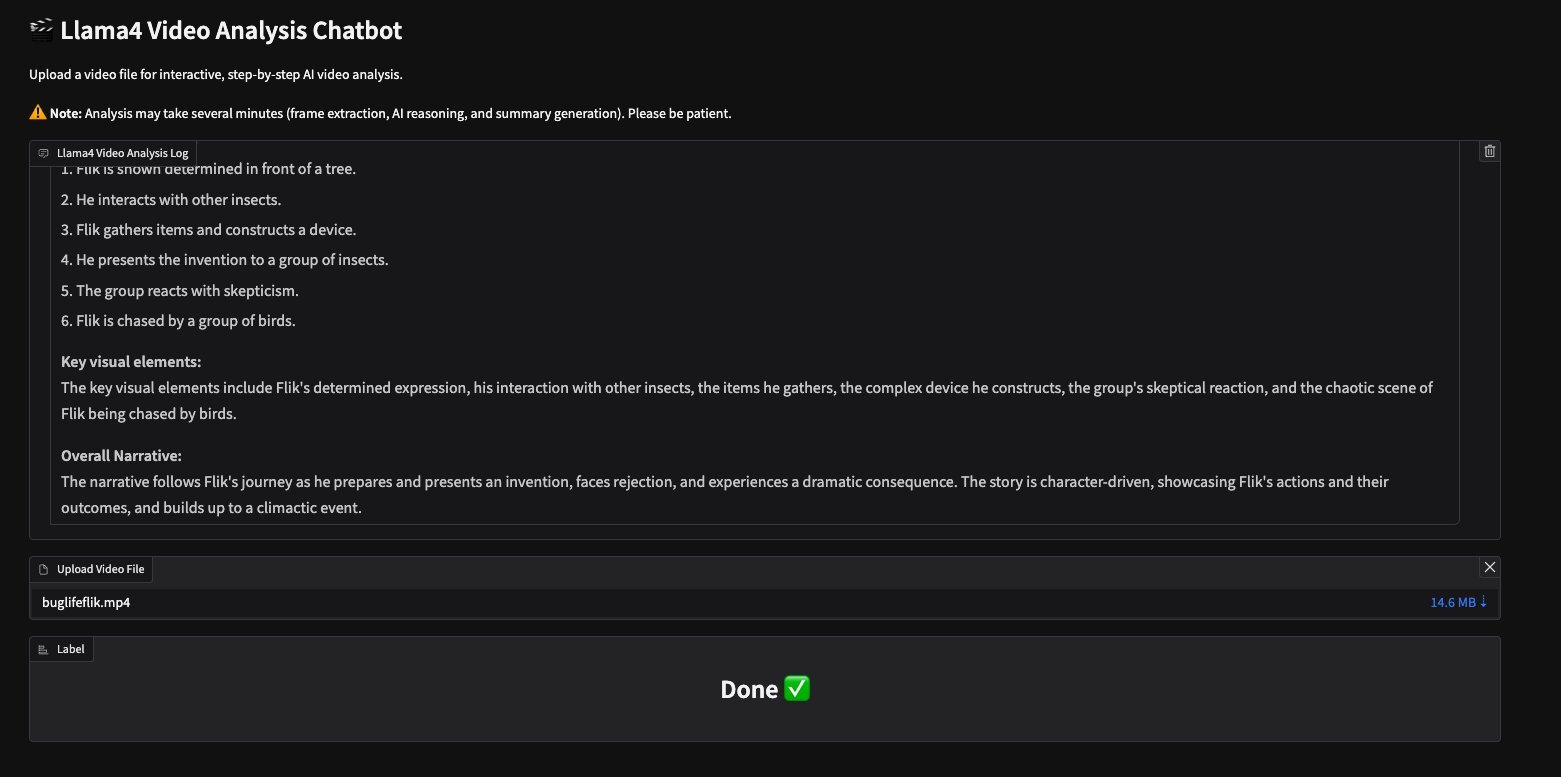
Meta的Llama视频分析助手为GitHub仓库中提供的视频buglifeflik.mp4提供了以下输出:
Llama Video Analysis Log
Flik is shown determined in front of a tree.
He interacts with other insects.
Flik gathers items and constructs a device.
He presents the invention to a group of insects.
The group reacts withskepticism.
Flik is chased by a group of birds. Key visual elements:
The key visual elements include Flik’s determined expression, his interaction with other insects, the items he gathers, the complex device he constructs, the group’s skeptical reaction, and the chaotic scene of Flik being chased by birds.
Overall Narrative:
The narrative follows Flik’s journey as he prepares and presents an invention, faces rejection, and experiences a dramatic consequence. The story is character-driven, showcasing Flik’s actions and their outcomes, and builds up to a climactic event.
以下屏幕截图显示了带有此输出的Gradio UI。
在Jupyter Notebook中运行
导入必要的库后,您需要手动将视频上传到您的S3存储桶:
def upload_to_sagemaker_bucket(local_video_path, base_folder="videos/"):
    sagemaker = boto3.client('sagemaker')
    s3 = boto3.client('s3')
    # Get default SageMaker bucket
    account_id = boto3.client('sts').get_caller_identity()['Account']
    region = boto3.Session().region_name
    bucket_name = f"sagemaker-{region}-{account_id}"
    # Get filename and create subfolder name
    filename = os.path.basename(local_video_path)
    filename_without_ext = os.path.splitext(filename)[0]
    # Create the full S3 path: videos/filename_without_ext/filename
    s3_key = os.path.join(base_folder, filename_without_ext, filename)
    # Upload file
    s3.upload_file(local_video_path, bucket_name, s3_key)

    s3_uri = f"s3://{bucket_name}/{s3_key}"
    print(f"Uploaded to {s3_uri}")

    s3_folder_path = os.path.join(base_folder, filename_without_ext)
    s3_folder_uri = f"s3://{bucket_name}/{s3_folder_path}"

    return s3_folder_uri # Example usage: Provide your local video path here
s3_video_uri = upload_to_sagemaker_bucket(local_video_path)
视频上传后,您可以通过实例化一个具有新对话历史的新智能体来启动智能体工作流:
# Start the workflow
agent = new_llama4_coordinator_agent()
video_instruction = f"Process a video from {s3_video_uri}. Use tools in this order: run_frame_extraction, run_visual_analysis, retrieve_json_from_s3, run temporal_reasoning, run_summary_generation_ upload_analysis_results"
response = agent(video_instruction)
print(response)
Tool #1: run_frame_extraction
Tool #2: run_visual_analysis
Tool #3: retrieve_json_from_s3
Tool #4: run_temporal_reasoning
Tool #5: run_summary_generation
Tool #6: run_summary_generation
**What happens in the video:**
The video follows Flik as he navigates through a series of events, starting from being cautious in a natural setting, seeking help or communicating with other insects, participating in a crucial discussion or planning, and finally taking action with the group. **Chronological Sequence of Events:**
The sequence begins with Flik being cautious near a tree, followed by him approaching a group of insects, then being part of a significant gathering or discussion, and concludes with Flik and the insects taking action together. **Sequence of events:**
1. Flik is initially seen being cautious in a natural environment.
2. He then approaches a group of insects, likely to communicate or seek help.
3. A gathering of insects is shown with Flik at the center, indicating a crucial discussion or planning.
4. The final scene shows Flik and the insects in action, possibly executing a plan or facing a challenge. **Key visual elements:**
The key visual elements include Flik's cautious initial stance, his interaction with other insects, the gathering or discussion, and the final action scene, highlighting the progression from solitude to collective action. **Overall Narrative:**
The narrative follows Flik's journey from caution and seeking help to participating in a crucial discussion and finally to taking action with a group of insects, suggesting a story arc that involves progression, planning, and collective action.
Tool #7: upload_analysis_results
The video processing is complete. The final analysis results are saved to s3://sagemaker-us-west-2-333633606362/videos/buglifeflik/analysis_results_20250818_190012.json.The video processing is complete. The final analysis results are saved to s3://sagemaker-us-west-2-333633606362/videos/buglifeflik/analysis_results_20250818_190012.json.
清理
为避免产生不必要的未来费用,请清理您作为此解决方案一部分创建的资源:删除Amazon S3文件:
- 打开AWS管理控制台
- 导航到Amazon S3
- 找到并选择您的Amazon SageMaker存储桶
- 选择您上传的视频文件
- 选择删除并确认
停止并删除SageMaker笔记本:
- 转到AWS管理控制台中的Amazon SageMaker AI
- 选择Notebook 实例
- 选择您的笔记本
- 如果它正在运行,请选择停止
- 停止后,选择删除
结论
本文重点介绍了如何结合使用Strands Agents SDK、Meta Llama 4模型和Amazon Bedrock基础设施,以实现构建先进的多智能体视频处理工作流。通过使用通过工具即智能体模式进行通信和协作的高度专业化智能体,开发人员可以模块化复杂的任务,例如帧提取、视觉分析、时间推理和摘要。这种关注点分离增强了可维护性、定制性和可扩展性,同时使系统能够适应不断发展的业务需求。 [...]
🚀 想要体验更好更全面的AI调用?
欢迎使用青云聚合API,约为官网价格的十分之一,支持300+全球最新模型,以及全球各种生图生视频模型,无需翻墙高速稳定,文档丰富,小白也可以简单操作。
评论区